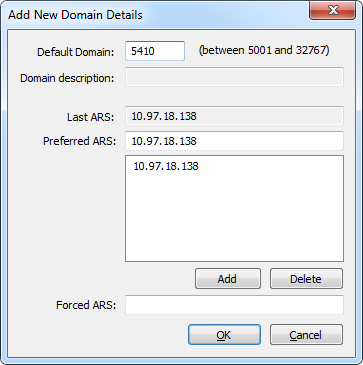
Use CygNet Host Manager Network Settings to set the Domain ID for the ARS running on the host server, to view the last ARS address used, and to specify the Preferred ARS and Forced ARS addresses to be used for connection.
All CygNet Services must be shut down before you can change domain details.
To Change Domain Details
The properties on the Add New Domain Details dialog box are described below.
| Property | Description |
|---|---|
|
Default Domain |
The Default Domain specifies the default domain identification for the ARS; values can be between 5001 and 32767. |
|
Domain description |
This option is not implemented. |
|
Last ARS |
The Last ARS Address is the IP address of the ARS on the Domain ID to which the computer last connected. |
|
Preferred ARS |
The Preferred ARS Address is the IP address on which to attempt to connect to the ARS on a domain. If the preferred ARS is stopped, the client will attempt to connect to another ARS on the same domain. The preferred ARS specifies the IP address of the ARS to which you prefer clients connect. On the host server, this is generally the IP address of the host machine. If an ARS is not running on this address, then the host machine will check its registry for other possible addresses. This address is primarily configured in the CygNet Domain Connection Utility, but also in the Network Settings of the CygNet Host Manager. Note: For replication to function correctly on separate subnets, you must configure the Preferred ARS for the domain ID of the source service where replicated data is being pulled. Multiple Preferred ARS Addresses You may need to configure multiple preferred ARS addresses per domain so that clients can communicate on a domain across a subnet. When configured on a host machine, each ARS service broadcasts its presence to all of the ARS services specified as preferred ARS addresses on startup and every five minutes after that. When searching for an ARS on a domain from that host, clients will attempt to find an ARS on each specified preferred IP address simultaneously. If one of the preferred ARS services on a different subnet fails over or becomes unavailable for another reason, clients will still be able to communicate with other configured preferred ARS addresses on that same domain. |
|
Forced ARS |
The Forced ARS Address is the one and only IP address on which the machine can connect to an ARS. If the ARS at this address is not available, CygNet communication will not be available. This option is not generally recommended because it excludes the chance of the client connecting with another ARS on the domain. This option takes precedence over the Preferred ARS Address. The Forced ARS address is primarily configured in the CygNet Domain Connection Utility. |
Also see CygNet Domain Connection Utility for more information about these values.
|
|
|

